
Fingerprint vs Facial Recognition Biometric Readers: Which Is More Reliable in Singapore’s Humidity?
 01 Oct 2026
Singapore’s heat and humidity can affect biometric hardware in different ways. With warm weather and high moisture levels throughout the year, users may have sweaty or damp skin when entering a building. This can affect how certain biometric readers capture and verify a person’s identity.
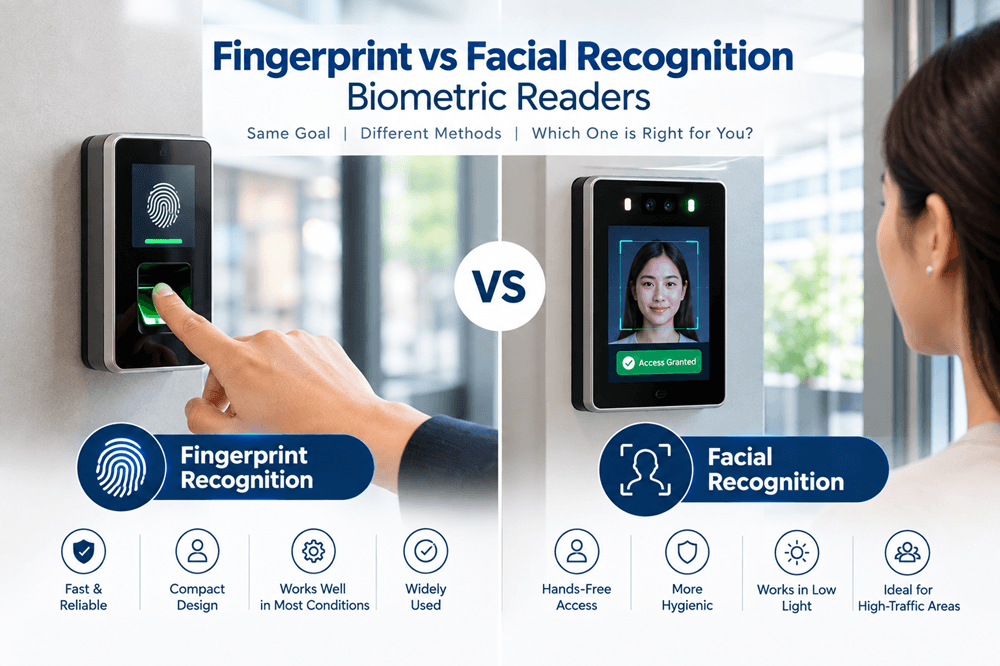
When comparing a fingerprint vs facial recognition biometric reader, the environment is an important consideration. Fingerprint scanners require clear contact with the finger, so sweat or moisture may affect the quality of the scan. Facial recognition is contactless, which avoids this issue, although lighting and camera positioning can influence its performance.
Choosing the right reader is therefore not just about price or features. You also need to consider accuracy, daily traffic, hygiene, and the conditions around the entrance. Understanding these differences can help you select a reliable option for your building in Singapore.
How Fingerprint Readers Work and Why Moisture Can Affect Accuracy
Fingerprint readers scan the unique ridges on a fingertip and compare them with stored data. However, moisture can affect how clearly the sensor captures the fingerprint pattern.
How Fingerprint Readers Identify Users
The reader captures the fingerprint pattern and converts it into a digital template. It then compares this template with the enrolled fingerprint before granting access.
- Scans the ridges and patterns
- Creates a digital template
- Matches it with stored data
- Unlocks the door after a successful match
Why Moisture Can Affect Accuracy
The humidity effect on fingerprint scanner performance is often associated with sweaty or damp fingers. Excess moisture can make fingerprint details more difficult for the sensor to capture accurately.
- Sweat may reduce scan quality
- Wet fingers may result in repeated scans
- Dirt or oil can affect the sensor
- Regular cleaning helps maintain biometric reader accuracy
This can be particularly relevant in Singapore, where users may arrive with sweaty or wet hands.
How Facial Recognition Readers Work and Their Sensitivity to Lighting Conditions
Facial recognition readers use a camera to capture facial features and compare them with stored data. Since users do not need to touch the reader, these systems provide contactless biometric access.
How Facial Recognition Identifies Users
The reader captures key facial features and creates a digital template. It then compares this template with an enrolled face before granting access.
- Captures facial features
- Creates a digital face template
- Compares it with stored data
- Grants access when a match is found
Why Lighting Conditions Matter
Good lighting helps the camera capture a clear image of the user’s face. Poor or uneven lighting can make recognition more difficult.
- Low light may reduce image quality
- Strong backlighting can obscure facial details
- Shadows may affect the scan
- Correct reader placement can improve reliability
For buildings in Singapore, positioning the reader away from strong sunlight and glare can help provide more consistent results.
Reliability Comparison in Humid, High-Traffic Environments
In Singapore’s humid climate, moisture and heavy foot traffic can affect how smoothly biometric readers operate. Here is a quick comparison:
| Factor | Fingerprint Reader | Facial Recognition Reader |
| Humidity | Sweat or wet fingers may affect scans | Less affected by humidity |
| High traffic | Users must stop and touch the sensor | Contactless scanning supports smoother flow |
| Failed scans | Damp fingers may require another scan | More likely linked to lighting or face position |
| Cleaning | Needs regular sensor cleaning | Less frequent cleaning due to no contact |
| User experience | Simple but requires physical contact | Quick and touch-free |
| Best suited for | Offices with moderate traffic | Busy lobbies and high-traffic entrances |
Overall, facial recognition may be better suited to humid, high-traffic environments because it does not depend on finger contact. Fingerprint readers, however, remain a practical option for controlled indoor spaces.
Hygiene Considerations: Contact-Based vs. Contactless Scanning
Hygiene is worth considering when many people use the same entrance each day. The main difference is simple: fingerprint readers need touch, while facial recognition does not. This can be an important factor when planning biometric access control for busy buildings.
Fingerprint Scanning
Users place their fingers on the same sensor, making it a shared touchpoint. Regular cleaning can help keep the reader clean and maintain its performance.
- Requires direct finger contact
- Needs more frequent surface cleaning
- May collect sweat, oil, and dirt
Contactless Facial Recognition
Facial recognition provides contactless biometric access, as users only need to face the reader. This reduces shared contact at busy entrances.
- No physical contact is required
- Reduces shared touchpoints
- Suits busy offices and common entrances
For high-traffic buildings, contactless scanning can provide a simpler approach to hygiene and daily maintenance.
Which Option Tends to Suit Factories, Offices, and Residential Lobbies Best
A biometric scanner should be selected based on the number of users, work environment, access requirements, and budget. Different building types may have different operational needs.
Factory
Factory workers may have sweaty or dirty fingers, which can make fingerprint scanning less convenient. Facial recognition does not require physical contact, making it an alternative for environments where hands may frequently become dirty.
Office
A fingerprint reader can be a convenient and affordable option for a small office. Facial recognition may be considered for a larger office where faster, contactless access is required.
Residential Lobby
A resident may enter the lobby while carrying a bag, package, or other items. Facial recognition allows access without requiring physical contact with a reader.
The final choice should form part of a well-planned biometric door access system in Singapore that can be used reliably every day.
Conclusion
Both fingerprint and facial recognition readers can provide secure and convenient building access. However, Singapore’s humid conditions may make facial recognition more suitable in situations where sweaty or wet fingers are common, as no direct skin contact is required.
Fingerprint readers can still provide reliable performance and good value, particularly in offices with controlled indoor conditions. They can also be a practical choice when keeping installation costs lower is a priority.
When choosing a fingerprint vs facial recognition biometric reader, consider your building type, daily traffic, environment, and budget. The right system should make access convenient while meeting your security requirements.
Frequently Asked Questions
Is Facial Recognition More Hygienic Than Fingerprint Scanning?
Facial recognition is contactless, so users do not need to touch a shared sensor. Fingerprint readers require physical contact, meaning the scanning surface may need regular cleaning, particularly in busy offices or buildings.
Which Biometric Reader Type Works Faster in High-Traffic Areas?
Facial recognition can help speed up access because users do not need to touch the device to verify their identity. Fingerprint scanning may take longer when users need to scan again because their fingers are wet, dirty, or sweaty.
Can Facial Recognition Readers Struggle with Poor Lighting?
Yes. Low lighting, shadows, and bright backlighting can make facial recognition more difficult. Proper lighting and correct device placement can improve the reader's ability to recognise users at building entrances.
Which Biometric Option Is Generally More Affordable to Install?
Fingerprint readers are often a more affordable choice, particularly for smaller offices. Facial recognition systems may cost more because of their camera technology and additional features, although the final cost depends on the hardware and installation requirements.
Choosing the Right Biometric Technology for Your Building?
Explore our biometric reader range suited to Singapore’s climate and traffic needs.